README.md
# BLE Air Mouse PCB

Integrated rechargeable ESP32 air-mouse PCB based on the
`LegendofKARTIS/ble-air-mouse` firmware and `T-vK/ESP32-BLE-Mouse` library.

## Hardware

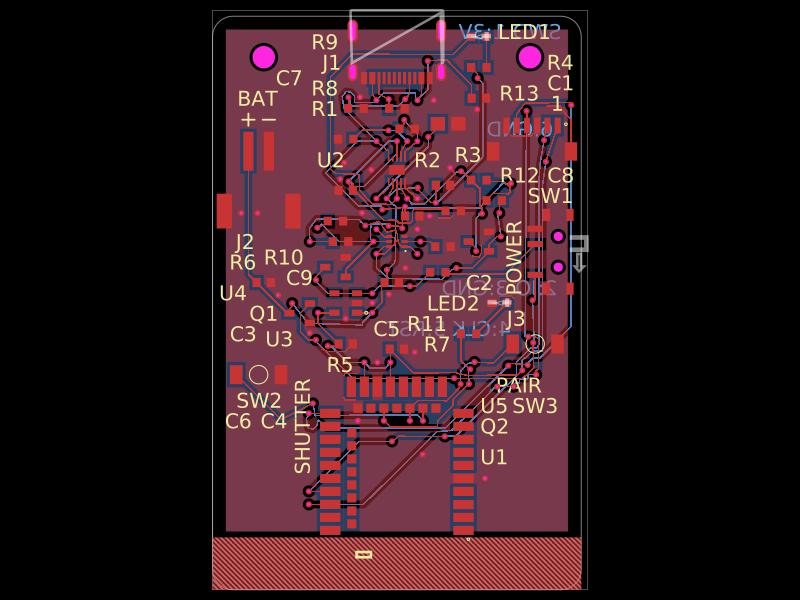
- ESP32-WROOM-32E-N4 (JLCPCB/LCSC C701341)
- ICM-20948 9-axis IMU, using GPIO21/GPIO22 with INT on GPIO23
- Left/right buttons on GPIO19/GPIO5, matching `airMouse_with_drag.ino`
- USB-C input with correct 5.1 kOhm CC pull-downs
- MCP73831 1-cell charger configured for about 500 mA
- AP2112K 3.3 V / 600 mA regulator
- JST-PH battery connector, switch, and charge LED
- Reset/boot buttons and 6-pin 3.3 V UART programming header
- 44 x 68 mm blue board with bottom-side tscircuit branding; no mounting holes

Critical footprints were imported from JLCPCB and retain LCSC supplier metadata
and 3D models. The current IMU is ICM-20948 (C726001). Generic 0603 parts have
JLCPCB part numbers in the circuit source.

The schematic is grouped into USB input, charger, regulator, controller, motion,
and external-interface sections. No schematic maximum trace distance is set.
C9/C10 have a PCB-only 10 mm decoupling routing constraint; this does not control
schematic wire lengths or labels.

## Battery safety

Use only a **protected 1-cell Li-ion/LiPo battery** (3.7 V nominal, 4.2 V full)
with the correct JST polarity. Charging is onboard; cell over-current and
undervoltage protection must be in the battery. Confirm polarity before assembly.

## Programming header J3

Pins: `3V3, GND, TX, RX, EN, IO0`. Use a 3.3 V UART adapter, never 5 V logic.
Connect adapter TX to RX and RX to TX. Hold BOOT, tap RESET, release BOOT, upload.

Arduino libraries:

- https://github.com/T-vK/ESP32-BLE-Mouse
- An ICM-20948 driver (the original MPU6050/MPU-9250 firmware needs adaptation)

## Validation

```sh
npm install
npm run typecheck
tsci check netlist
tsci check schematic-placement
tsci check placement
tsci check routing-difficulty
tsci build --pcb-png --schematic-png --3d-png
tsci check shorts
```

Check the current build and short-check results after every PCB change;
older exported Gerbers and validation results do not validate a newer layout.
Before ordering, inspect in `tsci dev`, export Gerbers/BOM/PnP, confirm current
JLCPCB availability, and obtain an independent electrical/manufacturing review.