rushabhcodes/desk-fidget-counter
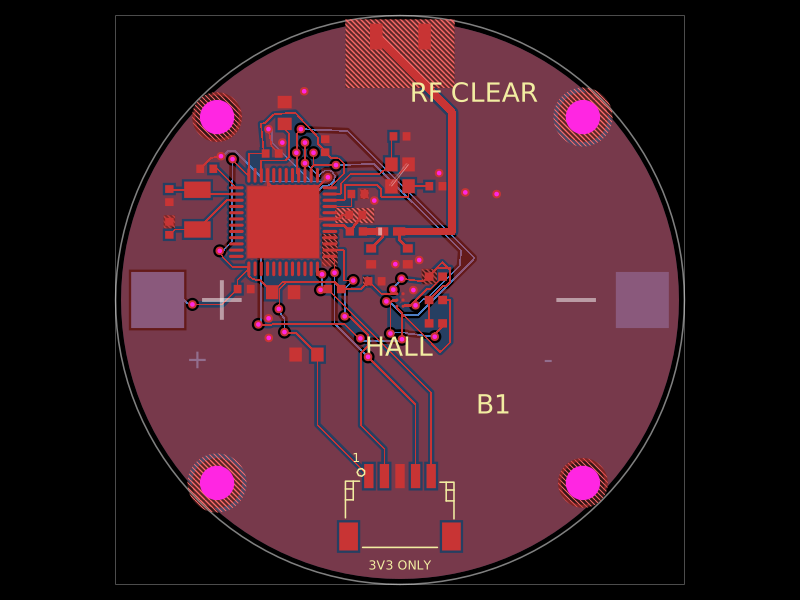
A desk knob assembly combining a circuit board with PETG-printed mechanical parts and vendor CAD-modeled hardware.
- Version
- 5.6.1
- License
- MIT
- Stars
- 0
companion/README.md
# Laptop dashboard companion

Desk Knob Rev E displays the computer's **local clock/date, total CPU usage, RAM usage and laptop battery percentage**, together with retained turns and scroll mode. Run this small local Python program on macOS, Windows or Linux. It uses USB CDC serial; ordinary scrolling uses USB HID and works without the companion. No network service, account, API key or administrator access is used.

## Install and run

Use Python 3.10 or newer. In a terminal inside the project:

```sh
python3 -m venv .dashboard-env
source .dashboard-env/bin/activate
python -m pip install -r companion/requirements.txt
python companion/dashboard.py
```

On Windows, create the environment with `py -m venv .dashboard-env`, then activate with `.dashboard-env\Scripts\activate`. The other commands are the same. Stop with Ctrl+C. The companion reconnects after unplugging or waking the computer. Set it to launch at login only if you want it running continuously; installation does not change startup settings.

Automatic discovery checks VID:PID `CAFE:4011`, then verifies `device=desk-fidget-counter, protocol=1` in the firmware's STATUS reply. Those USB identifiers are development examples shared with other projects, so identity checking is required. When several knobs are present, select the intended port:

```sh
python companion/dashboard.py --port /dev/cu.usbmodem1234  # macOS example
python companion/dashboard.py --port COM5                # Windows example
python companion/dashboard.py --port /dev/ttyACM0         # Linux example
python companion/dashboard.py --sample                   # inspect local metrics without USB
```

Linux serial permissions must allow access to the selected port (typically the distribution's `dialout` or `uucp` group). A port already open in another serial monitor may be unavailable; close that monitor first. The program does not modify system permissions.

## Meaning and disconnect behaviour

CPU is the system-wide percentage over the previous sampling interval, across all logical CPUs. RAM is `psutil.virtual_memory().percent`. Battery is the **laptop's** reported percentage, and `AC` means it reports external power. A desktop or an unavailable battery sensor shows `NO HOST BATTERY`. The knob has no battery.

Samples arrive once per second. The device advances the clock between updates and handles midnight/calendar rollover. After five seconds without a valid sample, it replaces clock/metrics with placeholders and `HOST OFFLINE`. Counting and scrolling continue while USB is configured and awake. USB suspend turns the LCD and optical emitter off; turns made during suspend are not measured or replayed on resume.

## USB protocol v1

115200 baud is the serial API setting; USB CDC does not use a physical UART baud rate. DTR must be asserted. Send newline-terminated ASCII, maximum 63 bytes per command. `STATUS` returns one JSON line. `RESET CONFIRM` deliberately initializes/zeros the journal. Dashboard example:

```text
DASH 17:45:29 2026-11-04 428 612 87 1
```

Fields: local `HH:MM:SS`, Gregorian `YYYY-MM-DD` (2020–9999), CPU tenths-percent (0–1000), RAM tenths-percent (0–1000), host battery percentage (-1 unavailable, otherwise 0–100), AC (0/1). A valid update has no acknowledgement. Invalid packets return `ERROR DASH` and leave the last valid sample unchanged. Firmware checks dates and numeric bounds and discards oversized lines. The companion checks application liveness every five seconds.

Metrics access and serial transport were tested on Linux using a real pseudo-terminal. Actual USB enumeration, laptop suspend/resume and display hardware still need prototype testing on macOS, Windows and Linux.
Related Packages
 More from this authorrushabhcodes/fidget-counter
 Discover something newDevesh36/orbit-turntableORBIT is a USB-C-powered display turntable for photographing jewellery, models and small products. Four-layer ESP32-C3 / ULN2003 PCB, geared stepper, OLED, push encoder, home switch and buzzer, with an enclosed and exploded assembly. Hardware prototype; firmware and physical qualification remain separate.